Serving the small to medium size business community with cost saving and revenue and performance enhancement solutions and support...

Welcome to TDI!

We are a full service IT company assisting small and medium businesses with all dimensions of technology. Select from the tabs about to review the products and services that we offer.

Use your money, don't spend it...
■ Do you use technology to gain an edge on your competition?
■ Are you taking advantage of free, open source software?
■ Are your computers producing the results you expect?

Let TDI guide you through the overwhelming world of options in the computer industry so that you can maximize your money, time and existing resources.


About TDI - Technology Dimensions, Inc.

Are you working for your computers or, are your computers working for you?

Let TDI guide you through the overwhelming world of options in the computer industry so that you can maximize your investment, time and existing resources.

Incorporated in 1999, TDI provides IT services throughout the Orange County, California area. TDI's consultants can show you how to make the most of your current and future IT investments by properly aligning them with where you want to take your business while helping to reduce the cost and complexity of getting there.

Our niche is to be an IT provider that complements companies that are on their way to having a full-time IT department. In fact, we are willing to assist you with the acquisition of staff as you grow. For those with a full-time IT staff, we provide speciality assistance, vacation coverage and such services to assist with overload situations.

We do everything from wiring (or wireless), to building machines and servers, to installing and setting up applications, accounting, custom programming, email, Internet, security, annual budget preparation and more.

Our goal is to develop a long lasting relationship with all of our clients. We create a plan to maintain their existing network, add space, increase security, increase performance, add redundancy and keep our clients informed of new options. We help with adding new computers, creating how-to documents, setting up users to work remotely (from home or a satellite office) with a bent toward the development of a consistent, integrated business growth solution.


Technology Dimensions, Inc.
635 N Eckhoff St Ste G
Orange, CA 92868-1046

Phone: 714-456-9835

Monday-Friday
9am-6pm PST

info@technologydimensions.com

Please call before you arrive since our technicians are frequently out in the field. Please leave a message should everyone be busy.

Expand the dimension of your IT solution using a Satellite Home Office...
■ Are you a company that could take advantage of having some of your employees/vendors work from home?
■ Are you an employee that is being offered the opportunity to work from home?

As a company, having some of your employees work from home can be a clear advantage to both you and the employee. For the employee, it is in effect a raise. Perhaps a significant raise yet, without an increase in your payroll and benefit costs. Considering these economic times, you could keep a loyal employee as a part time employee. A completely protected facility can be created for these outside users which can include freelance consultants as well.

Perhaps you can this strategy to free up office space for another use.

Consider these...
■ How many of your employees do not need to be on-site every day?
■ Connect your off-site user with an private IP Phone extension.
■ Make it more personalable with a video phone using a web camera. Many of today's laptops are equipped with a built-in webcam.
■ Be green! Reduce the number of your commuters.
As an employee, the benefit of having a technically sound solution cannot be overstated.

Consider these...
■ Should I use a laptop or a desktop or a netbook?
■ Can I reduce my cost outlay by using open source software?
■ Is a high-speed Internet connection worth it?
■ Where can I backup my files?
■ Should I use wireless? Is it secure?
Is your Technology Score the winning number?.
■ Would your longest outage be under 1 hour including data recovery?
■ Can you tolerate a power outage long enough to complete an orderly shutdown?
■ Are all of your computers using the most recent software?
■ What technology do you plan to purchase during the next 12 months?
■ Do you have 24/7 technical support?


The benefit of good equipment, well structured and well maintained cannot be overstated.

Consider these...
■ Improve the productivity of a user with the mere replacement of their workstation.
■ Improve the productivity of a user with a higher performance connection.
■ Structure and implement your LAN to assure the highest speed at every workstation.
Let us replace the power supplies in your computers with green power supplies and save 15% in electricity per machine.

We sell Thin Client machines which only consume 15 watts under a full load.

Consider these...
■ Make power consumption a high priority consideration when evaluating new equipment?
■ We have record lows of clients paying $4.65/month/computer powering Machine+2 LCDs+Printer+UPS. In contrast, other machines in the same company cost $13.56/month/computer. Would you be interested in an electrical audit?
■ Use hibernation rather than shutdown to reduce your power consumption yet provide a fast startup?
In the event of a power outage, can you execute an orderly shutdown without any loss of data?
■ Every server, every storage unit, every KVM, every workstation, every switch, every router and every monitor should be able withstand any power surge or a power outage of 15 minutes.
■ The UPS that is the power protection for your servers and network should allow the replacement of batteries or a failed control board without the shutdown of all the attached devices.
■ Your power distribution system within your racks should allow the capability to remote cycle the power to a piece of equipment. Even a piece of equipment with redundant power supplies.
■ Your power protection equipment should also provide extended protection against brown-outs, i.e., provide power boost.
■ Does your test of emergency generator power include using it as your only source of power for one hour or more?
Data protection has many facets including protection against hardware failures, inadvertant file deletion or write-over, etc.

Consider these...
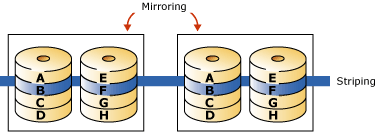
■ Use the rock-solid protection of RAID 1 or RAID 5 or, the rock-solid protection and speed of RAID 10.
■ It is not about backup, it is about recovery of which backup is but one ingredient of a good solution. For example, can you recover a lost or damaged file within one hour? What it the file is a year old?
■ Use solid-state drives to eliminate the element of mechanical failure.
■ Limit access to your server to a chosen few.
■ Chose an anti-virus software that automatically updates serves and workstations when needed without requiring any manual intervention and have a quality control procedure in place that confirms its installation on every new and repaired machine.
■ Use one of the many of the available logging facilities to trace actions by authorized or unauthorized personnel to determine the cause of a data loss.
Network speed is one of the most important assets to achieving the highest user productivity and there are many powerful and economical ways to achieve it.

Consider these...
■ Use only switches which reduce traffic and use only gigabit Switches.
■ Provide a gigabit connection to all equipment that have a gigabit adapter.
■ To increase security, implement a DMZ, or a VLAN or at a minimum, move isolated networks to a different subnet.
Consider these...
■ Require only the floor plan of your building(s) as the documentation for your cable plant.
■ Know that your cabling is capable of supporting gigabit speed: use CAT5e or CAT6 and have it tested.
■ Be aware that 10Gb switches can be purchased for $500.00 per port.
Expand the dimensions of your ERP solutions...
■ Do you want to enhance your ERP solution?
■ Do you want to reduce the reliance on spreadsheets, particularly those not directly generated by your ERP/Accounting System?
■ Add a web interface to interface with your customers and/or add more users!

We can assist you with enhancements to Microsoft's Dynamics NAV (Navision)

Consider these...
■ Use a web interface to add users to your system without adding user licenses.
■ Add reports that contain only the information that you want and in a timely fashion.
■ Excel exports that can be used to reconcile with data not yet integrated into the system (with a plan to get rid of the these as well).
■ A web interface to allow all your employees and contract personnel to enter their daily time card or record a delivery.

We can assist you with enhancements to Infor (Syteline)...

Consider these...
■ Use a web interface to add users to your system without adding user licenses.
■ Add reports that contain only the information that you want and in a timely fashion.
■ Excel exports that can be used to reconcile with data not yet integrated into the system (with a plan to get rid of the these as well)?
■ A web interface to allow all your employees and contract personnel to enter their daily time card or record a delivery .
Do you want to start with a software system and never have to change it as you grow?

There is much to say on this topic and it will be coming soon!
Do any of these sound like they would add to your revenue or reduce your costs?
■ Are you receiving the reports you need in a timely manner?
■ Do you have salaried personnel working overtime on job for which you are not getting paid for their time?
■ Do you want/need to share data between your ERP/accounting system and other applications used in your business?
■ Do you want/need to eliminate manual duplication of already entered data?
■ Would the add of barcoding or RFID for tracking and ERP input?
■ Create a web interface with all the protective checks and balances that allows customers to enter orders and/or employees to enter production, shipping, maintenance, etc. data.
■ Automatically create an invoice in PDF format and EMAIL it.
Expand the dimensions of your IT solutions...
■ Does your equipment and your network provide the performance to support your productivity goals?
■ Can your system keep all the users fully operational long enough to accomplish an orderly shutdown in the case of a power outage?
■ Can you resolve any outage within one hour?

The benefit of good equipment, well structured and well maintained cannot be overstated.

Consider these...
■ Improve the productivity of a user with the replacement of their workstation. At today's prices, the return on the investment will be very quick.
■ Improve the productivity of a user with a higher performance connection.
■ Use hibernation rather than shutdown to turn off a computer yet provide a fast startup. Also, it quickly reminds the user of exactly where they left off at quitting time.
■ Structure and implement your LAN to assure the highest speed at every workstation.
Electricity demand is another area where costs can be reduced.

Consider these...
■ Call us for a quote to replace the power supplies in your computers with green power supplies and save 15% in electricity per machine.
■ Call us for a quote for Thin Client computers which only consume 15 watts under a full load. Take note, this reduces UPS size and cost as well.
■ Consider the cost of electricity when purchasing new equipment. Make it a point of competitive assessment.
■ We have record lows of clients paying $4.65/month/computer powering Machine+2 LCDs+Printer+UPS. In contrast, other machines in the same company cost $13.56/month/computer. Call us if you are interested in a power consumption audit.

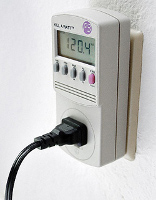
Above is an example of a watt meter.
We use a wattmeter that installs in the fuse box and radios the usage to a remote display.
In the event of a power outage, can you execute an orderly shutdown without any loss of data?

■ Every server, every storage unit, every KVM, every workstation, every switch, every router and every monitor should be able withstand any power surge or a power outage of 15 minutes.

Most people think of a blackout or lighting in response to power protection, but it involves protecting against low voltage too.
Can you recover from loss of a hard drive on a workstation?
Can you prove that the failed part is under warranty and thus avoid paying for its replacement?

Consider these...
■ Use our TMS licensing module to track software licenses.
■ Closely integrate the tracking of your assets within your accounting system so that all the placement and user information resides with the Purchase Invoice.
■ Use barcoding to assign licenses to machines.
■ Microsoft's Volume Licensing or Software Assurance makes it easier.
■ Acquire and use Mirosoft Software Inventory Analyzer (it's free!).
■ Configure your workstations to prevent the install of unauthorized software.

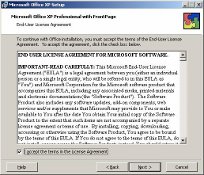
Question: If an open license version of Microsoft Office is installed on a Terminal Server, is a license for Office required for each user that logs in?
(Hover over this text for the answer)
■ Use barcoding, RFID and QR Codes to assist with inventory, tracking and data entry.

Sample QR barcode. See Wikipedia for more information.
Increase your ability to tolerate a business interruption...
■ Do you have the ability to easily and quickly relocate?
■ Are your employees aware of alternate routes to get to your facility?
■ Can you operate if your Internet connection is not functioning?


Consider these...
■ Do you have a backup Internet connection (perhaps at a lower speed) to assure no loss of service should the primary service fail?
■ Does your Internet connection provide all the bandwidth that your organization needs? Would a fractional DS3 connection better serve your needs for growth without having to migrate to new hardware?
■ Are your primary and secondary services sourced out of two different Central Offices?
■ Do you have a backup such that your router that can be quickly replaced?
■ What is the backup for your email server?

Consider these...
■ Is your LAN organized and segregated to prevent the spread of a virus?
■ Can you quickly shutdown the LAN to prevent the spread of a virus and yet quickly restore those segments identified as "clean"?
■ What is the method to regularly update your virus protection and how often to you confirm it is working?
Call TDI for a current quote on a solid-state disk to enhance the peformance of existing machines.
We find and remove the bottlenecks in your systems.
■ Boot faster. Work faster.
■ We stay on the edge of technology to find solutions to any performance problem.
■ Check out the tabs below for examples of technology you can apply.
■ Have questions? Interested to have us examine your system? Call us!
■ We work with existing equipment and with company budgets to achieve maximum balanced performance with any budget.

Below are some examples of technology that can alievate common bottlenecks.


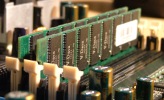
One of the easiest (and cheapest) way to speed up your machine is to increase memory
Our memory is guaranteed 100% compatible and comes with a lifetime warranty.
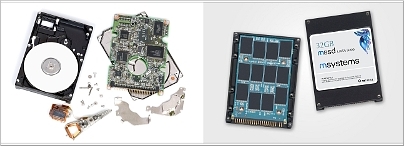
Another cost-saving way to extend the life of an existing workstation or enhance the performance of a new workstation is to replace the typical hard-disk drive with a Solid-State Drive (SSD). They are made 100% out of fast flash memory. Dimensionally they come packaged in the same housing and with the same connectors as a typical hard-disk drive.

Above is a YouTube video showing two laptops side by side. One has a spinning hard disk. The other has a solid-state drive.

Left: Disassembled hard disk drive.
Right: Disassembled solid-state disk.
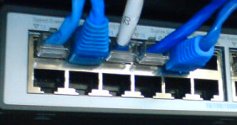
Upgrading network gear and the Network Switch from 100 Mbit/s to 1000 Mbit/s can greatly improve the performance of network activity.

This is especially noticible with machines that share large files.

Performance can be gained in design and network settings. Whereas the previous tabs focus on physical items, software settings and design can greatly improve performance too.

For example:
■ Archive old accounting data out of your active data set.
■ Apply Active-Directory settings to reduce network traffic.
■ Tune databases by adjusting indexing values and the location of database files.
■ Are you putting CAD/Photo Editing/Video Editing swap files on the same volume as the application?
■ Different applications can perform the same tasks faster. For example, trying using Control-Click in Google Chrome compared to Internet Explorer.